Scoutbase
Senior Capstone Project
Introduction to Scoutbase
Scoutbase is a mobile and web-based platform designed to connect high school baseball players with college coaches and scouts. The problem we aimed to solve was the inefficiency in the recruitment process for high school athletes, making it difficult for them to showcase their talents to potential coaches and scouts.
Technologies Used
The project was built using a Django REST API for the backend and a React Native front end for mobile applications. I chose Django to familiarize myself with the Python language, as expanding my skillsets in Python is a goal of mine. I selected React Native because of my familiarity with the JavaScript language and the framework's established presence in the industry. Additionally, industry best practices such as RESTful API design and responsive design principles were implemented.
The application is not deployed in the cloud; however, it utilizes a cloud-based MySQL database hosted on Heroku. This decision was made to minimize costs, as there are no immediate plans to deploy the application to the app store. DevOps principles were applied through effective source control management using GitHub, facilitating collaboration and version tracking throughout the development process.
During this project, I learned new technologies such as Django, React Native, and Expo which were essential for building the application.
Features and Technical Approach
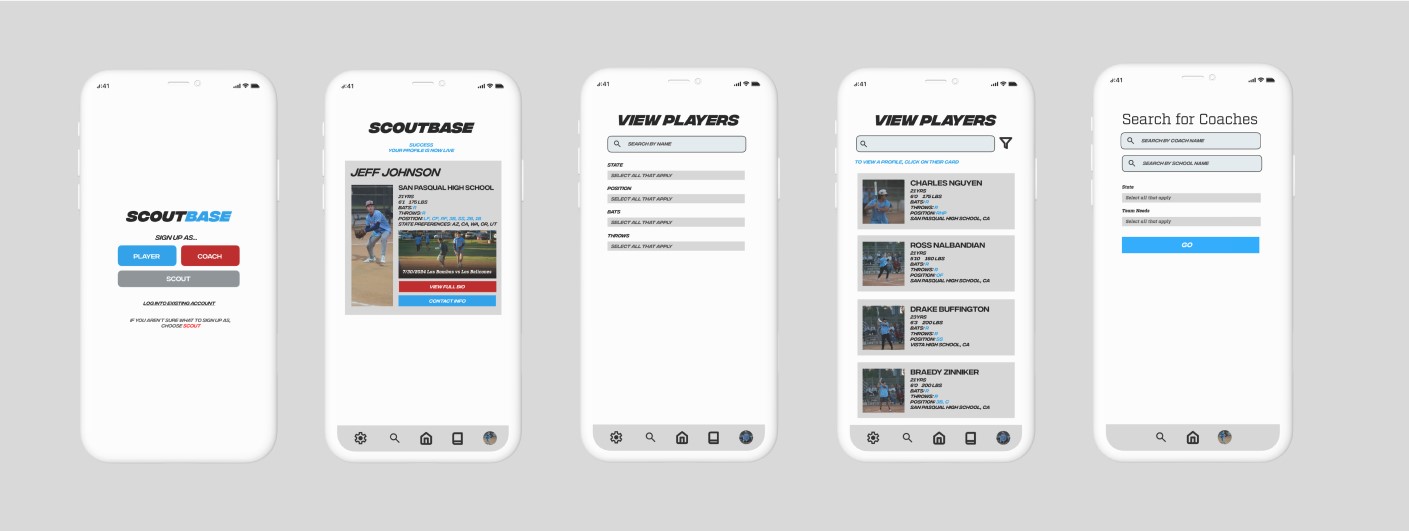
Key features of Scoutbase include athlete profile creation, video uploads, statistics showcasing, and a search functionality for coaches and scouts to find players based on specific criteria.
The technical approach involved creating a RESTful API to handle data transactions between the frontend and backend, ensuring a smooth user experience. Various design diagrams, including ER diagrams and class diagrams, were created to support the technical aspects of the project.
Requirements
Functional Requirements:
- Users must be able to register, log in, and authenticate using secure credentials.
- Athletes can create and edit personal profiles including stats, highlight videos, and physical attributes.
- Coaches and scouts can search for athletes using filters such as position, height, or school.
- The system must allow users to be assigned roles (athlete, coach, or scout) after registration.
- Coaches must be able to list their team needs and search for potential recruits.
- All user data is retrieved and updated via RESTful API endpoints.
Non-Functional Requirements:
- The application must be accessible via mobile devices and optimized for performance using React Native.
- The back-end must provide secure, scalable APIs built with Django REST Framework.
- All communication between front-end and back-end must be protected with JWT authentication.
- The system must provide consistent performance with a fast response time across devices.
- Data integrity and validation are enforced at the API level to prevent faulty or malicious data entry.
AI Integration
Ethical Use: AI tools were used responsibly to support development, not replace original work — all logic, architecture, and content were developer-led.
Academic Support: Leveraged ChatGPT for error clarification and design guidance while ensuring full understanding of the material.
Productivity Boost: Used Cursor IDE (GPT 4.0) to improve naming conventions, clear and descriptive comments, and assist in writing unit tests — saving time for core feature development.
Idea Validation: Brainstormed feature implementations and evaluated architectural decisions using AI as a second opinion, not a final authority.
Challenges and Risk Management
During the development of Scoutbase, I faced several significant challenges, particularly in setting up the initial projects in Django and React Native. To overcome these hurdles, I leveraged a variety of resources, including online courses, documentation, and tutorials. For instance, I utilized YouTube tutorials to gain a clearer understanding of the frameworks, which helped me navigate the complexities of both Django and React Native.
The GeeksforGeeks tutorial on Django REST API was particularly helpful for implementing CRUD operations effectively. Additionally, I found the Expo documentation invaluable for getting started with React Native, which guided me through the process of building the front end of the application. I also consulted the official Django documentation for best practices and troubleshooting tips, which proved essential in refining my approach to backend development.
To ensure a smooth development process, I proactively identified potential issues early in the development cycle. By anticipating challenges, I was able to implement solutions before they escalated. The following resources were instrumental in assisting my development process:
I leveraged the following courses, youtube videos, articles, and documentation sources to referance and assist my development process:
Outstanding Issues
Currently, there are no outstanding issues.
Code Repositories
Implementation Details
Prerequisites:
If you are using a Mac:
- Install XCode, run iPhone simulator at an iOS above 16.
If you are using an Android:
- Install Android Emulator, run Google Pixel 9.
To run the app, you first need to run the back-end:
- Clone the back-end repository from GitHub. (Linked above)
- Import the project into your desired IDE (VSCode recommended).
- Create and activate a virtual environment using
python -m venv envandsource env/bin/activate(orenv\Scripts\activateon Windows). - Install the required dependencies using
pip install -r requirements.txt - Start the development server using
python manage.py runserver
To run the front-end mobile app:
- Clone the front-end repository from GitHub. (Linked above)
- Open the project folder in your desired IDE (VSCode recommended).
- Ensure you have Node.js and Expo CLI installed globally. You can install Expo CLI using
npm install -g expo-cli. - Run
npm installto install all dependencies. - Start the development server using
npx expo start. - Use an Android/iOS emulator or scan the QR code with the Expo Go app on your device to run the app.
Project Documentation
Project Proposal Document
Comprehensive overview of the Scoutbase application, including objectives, scope, timeline, and technical architecture.
View DocumentProject Requirements Document
Template outlining the requirements for the Scoutbase project.
View DocumentSolution Diagrams
Logical and Physical solution diagrams for the project.